Introduction
Picture a case manager juggling three spreadsheets, a stack of paper intake forms, and a notebook of follow-up reminders — just to answer one board member's question: "How many families did we actually help this quarter?"
This scenario plays out daily across the nonprofit sector. Many organizations still struggle with fragmented client records scattered across disconnected systems, making it nearly impossible to see the full picture of a person's progress.
The Administration for Children and Families notes that people receiving human services often deal with multiple organizations that don't share records, forcing clients to repeat their story and caseworkers to make decisions with incomplete information. This gap is detailed in ACF's research on navigating privacy when sharing human services records.
Closing these information gaps is exactly what a well-built dashboard does. This guide breaks down what case management dashboards actually are, the types nonprofits rely on, and the features that separate a genuinely useful tool from a glorified spreadsheet.
Key Takeaways
- A case management dashboard centralizes client, case, and program data into one interface for faster decisions.
- Dashboards typically blend four core functions: strategic, analytical, operational, and tactical.
- Effective dashboards support every case management stage, from intake through closure.
- Core features include caseload snapshots, outcome tracking, funder reporting, and real-time alerts.
- CharityTracker combines these features to cut paperwork and strengthen inter-agency coordination.
What Is a Case Management Dashboard?
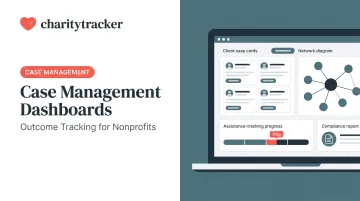
A case management dashboard is a centralized, visual interface that pulls together client records, case statuses, service history, and outcome metrics into one screen. Instead of digging through files or spreadsheets, case managers and administrators get an at-a-glance view of what's happening across their entire caseload.
This is a significant departure from how nonprofits historically operated. Paper intake forms and static spreadsheets have gradually given way to cloud-based systems that update in real time. HUD's Homeless Management Information System (HMIS) is a good example of this shift at the federal level. It standardizes how homeless services agencies collect and report client-level data, as outlined in HUD's HMIS program overview.
Who Actually Uses These Dashboards?
Dashboards typically serve four distinct audiences, each with different needs:
- Frontline case managers: need quick access to client history and daily task lists
- Program directors: need oversight of team performance and referral status
- Executive leadership: need high-level trends for board reporting
- Funders and auditors: need proof of impact and compliance documentation

Dashboard vs. Case Management System
The dashboard itself is the reporting and visualization layer. The broader case management system underneath handles the actual data entry, workflows, and secure storage. Think of the dashboard as the windshield and the system as the engine.
CharityTracker's Changes Over Time Report illustrates this well. It takes raw case data collected during everyday intake and service delivery and converts it into a readable snapshot of client progress. This gives administrators a way to see trends without manually compiling numbers from individual case files.
The Types of Dashboards Used in Case Management
Business intelligence research generally identifies four core dashboard functions, each built for a different kind of decision-making. Many nonprofit platforms also layer in role-based or individual views as a personalized way to filter what each user sees, rather than a fifth standalone category.
| Dashboard Type | Primary Use in Case Management | Example |
|---|---|---|
| Strategic | Long-term outcome trends for leadership | Board-level report on annual client outcomes |
| Analytical | Pattern detection across large datasets | Demographic trends or service gaps by region |
| Operational | Real-time daily activity monitoring | Today's open caseload queue |
| Tactical | Progress tracking on program-level goals | Monthly KPI tracking for a specific grant |
| Role-based (access layer) | Personalized view filtered to one user | A single case manager's assigned task list |
Why This Matters for Smaller Organizations
A small nonprofit with two or three staff members doesn't need five separate software tools to get this coverage. Most modern case management platforms, including CharityTracker, blend these functions into a single unified dashboard. The executive director can pull strategic reports while the case manager checks their daily queue, all within the same login.
This blended approach reduces training time and keeps everyone working from the same underlying data, which matters more than it sounds. When leadership and frontline staff are looking at different numbers, trust in the system erodes fast.
Essential Components & Features of an Effective Case Management Dashboard
Not every dashboard delivers real value. Here's what separates the useful ones from the decorative ones.
Effective platforms consistently include:
- Caseload snapshot: Total open cases broken down by status (new, active, escalated, closed) and priority level, visible the moment staff log in. This gives an instant workload overview without opening a case file.
- Service history and activity tracking: A running log of referrals, assistance provided, and service duration flags potential duplicate services across agencies, critical when multiple organizations serve the same family.
- Outcomes and goal tracking: Visual progress indicators show how individual clients are advancing toward goals, and how programs are performing against targets overall.
- Funder and compliance reporting tools: A customizable report builder generates audit-ready reports for grants and funders without manual compiling. One CharityTracker user called the feature "customizable and extremely professional looking" for board meetings.
- Alerts and notifications: Automated flags for urgent cases, approaching deadlines, and task reminders keep staff proactive instead of playing catch-up.
- Data visualization: Charts and graphs showing trends over time, client demographics, and service distribution support smarter strategic planning.

Each of these features turns raw data entry into something staff can act on quickly, without needing a spreadsheet expert on hand.
How Dashboards Support the Case Management Process
Case management associations generally describe the process in a series of connected stages, from initial contact through case closure. A dashboard should support every one of these stages, not just intake.
- Intake/Screening: The dashboard captures new client information instantly, often through digital or remote intake options like CharityTracker's kiosk mode, cutting out paper forms entirely.
- Assessment: Case managers see full client history and prior services immediately, allowing them to assess needs with complete context instead of starting from zero.
- Planning: Dashboard tools help set measurable goals directly tied to a client's case file, rather than jotting them in a separate document.
- Implementation: Service delivery, referrals, and financial or in-kind aid get tracked in real time across the full care team, closing gaps between agencies before they turn into missed appointments or duplicate assistance.
- Monitoring/Follow-up: Alerts and status indicators flag cases needing follow-up or at risk of stalling before they become a crisis.
- Evaluation: Visualizations show whether interventions are producing measurable outcomes against program goals, informing what to adjust going forward.
- Case Closure/Transition: The dashboard archives case history while retaining data for future reference, supporting continuity if the client re-enters services later.
That last step matters more than it seems. A client who disappears from the system for two years and returns during a new crisis shouldn't have to start their story over — the history should still be there.
Key Benefits of Using a Case Management Dashboard
The upside of a well-built dashboard shows up in four places: time, accuracy, coordination, and decision-making speed.
Time Savings on Paperwork
Centralizing client data eliminates duplicate data entry across systems. Nathaniel R., an office clerk and First Call for Help representative, reported that CharityTracker cut his paperwork time "in half, at least." That time savings now goes toward direct client work instead of manual data entry.
Better Funder Reporting
Compiling compliance reports manually is tedious and error-prone. A built-in report builder pulls directly from case data already entered, reducing the manual effort typically required for grant compliance documentation.
Stronger Cross-Agency Collaboration
This is where inter-agency dashboards earn their keep. CharityTracker's built-in referral network gives nonprofits, faith-based groups, and government agencies real-time visibility into what assistance a client has already received elsewhere. This visibility prevents overlapping aid and reduces fraud risk.
- Housing and shelter organizations using CharityTracker report an average 20% reduction in duplicated services
- Churches on the platform have seen duplication drop by as much as 91%
- One church administrator noted the software "paid for itself" by preventing fraudulent assistance payouts

Faster, More Informed Decisions
Real-time insights let organizations track long-term client progress instead of guessing at community impact once a year during grant season. CharityTracker's Changes Over Time Report, for example, shows exactly how a client's situation shifts across multiple visits, giving case managers evidence-based direction for the next intervention rather than a gut call.
Frequently Asked Questions
What is a case management dashboard?
It's a centralized, visual reporting tool that pulls together client, case, and outcome data into one interface. Case managers and administrators use it to monitor caseloads and measure impact without digging through separate files.
What are the main types of case management dashboards?
Most platforms combine four functional types (strategic, analytical, operational, and tactical), often with a role-based view layered on top for individual users. Together they cover leadership reporting, trend analysis, daily operations, and personal task tracking.
What are the steps of the case management process?
The general sequence includes intake, assessment, planning, implementation, monitoring, evaluation, and closure. A good dashboard supports data visibility at every one of these stages, not just intake.
What features should I look for in case management dashboard software?
Prioritize caseload tracking, outcome measurement, funder reporting tools, and strong data security. Alerts and referral tracking are also worth checking for if you work across multiple agencies.
Is client data secure on a case management dashboard?
Yes, as long as the platform maintains strict confidentiality and compliance controls. CharityTracker, for example, uses HIPAA-aligned data security built specifically for nonprofits and government agencies handling sensitive client information.
How much does case management dashboard software cost?
Pricing varies with organization size, user count, and included features. CharityTracker, for example, offers a Pro Plan starting at $60/month with API access and customizable assessments included, plus a free trial to test the platform first.